
Download Metric to Metric – Unit Converter, Metric Converter, Online Tool
Overview
Metric to Metric is a lightweight, web-based unit converter designed to simplify the process of switching between metric units of measurement. It supports conversions across key categories including weight, length, volume, and fuel consumption, making it a practical tool for students, professionals, and everyday users who need quick and accurate unit translations. The software operates entirely in the browser, requiring no installation, and is accessible from any device with internet connectivity. Its primary function is to eliminate the need for manual calculations or external tools when converting metric values.
The application is particularly useful in educational settings, scientific work, travel planning, and international trade, where consistent metric usage is essential. For instance, a student working on a physics assignment can instantly convert meters to kilometers, or a traveler comparing fuel efficiency across countries can switch between liters per 100 kilometers and miles per gallon. The developer, Convert My Money, has positioned this tool as part of a broader suite of utility applications, suggesting a focus on user-friendly, no-frills digital tools.
As a web app, Metric to Metric leverages modern browser capabilities to deliver real-time conversion updates without requiring downloads or updates. The developer did not provide additional system requirements, and no specific platform limitations were mentioned. The tool is currently in active development, with the team inviting user feedback through a dedicated form on their website.
Key Features & Capabilities
- Real-time automatic conversion – As soon as a user enters a value in any input field, all other units are updated instantly without requiring a button press.
- Multi-unit support – Handles conversions across four core categories: weight, length, volume, and fuel consumption.
- Universal input and output – Every input field is dynamically linked, so editing any result automatically recalculates all other values.
- Web-based accessibility – Runs directly in the browser, compatible with any device that supports modern web standards.
- Minimalist interface – Designed for simplicity, with no clutter, ads, or unnecessary features.
These features make the tool ideal for quick, on-the-fly calculations. For example, a cook adjusting a recipe from grams to kilograms can enter the value once and see all related conversions instantly. Similarly, a logistics planner comparing shipment weights across different metric units can use the tool to maintain consistency. The seamless workflow ensures that users remain focused on their tasks without being interrupted by complex menus or navigation.
User Interface, Workflow & Performance
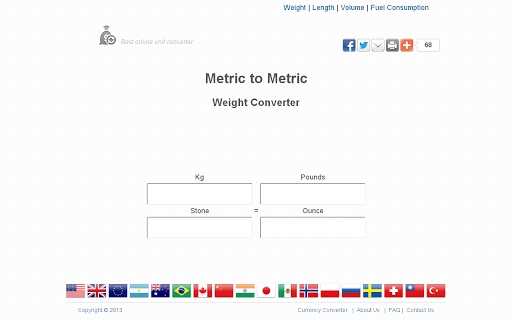
The user interface of Metric to Metric is clean and intuitive, built around a single input/output grid that displays all relevant units in a straightforward layout. Navigation is minimal—users simply type a number into any field, and the rest of the values update automatically. There are no menus, settings, or additional tabs to navigate, which reduces cognitive load and enhances usability.
Workflow efficiency is high due to the real-time nature of the tool. There is no need to click a “Convert” button or wait for processing; the conversion happens as the user types. This responsiveness is typical of well-optimized web applications and aligns with modern expectations for instant feedback. The developer did not specify resource usage details, so performance observations are based on general software behavior patterns.
Stability appears to be consistent with its lightweight design. Since it runs in the browser and relies on client-side processing, it is unlikely to cause system slowdowns. However, actual CPU and RAM behavior depends on the user’s device and browser. The application is accessible on both desktop and mobile devices, though the interface may adapt differently depending on screen size.
Compatibility & System Requirements
Metric to Metric is a web application, meaning it runs in any modern web browser such as Chrome, Firefox, Safari, or Edge. It does not require installation and is compatible with any device that supports standard web technologies. The software is accessible from Windows, macOS, Linux, and mobile operating systems, provided they have a functioning internet connection and a current browser.
The application has a file size of 200 KB, which indicates a minimal footprint and fast loading times. The developer did not specify exact hardware or software requirements beyond browser compatibility. Compatibility information was partially provided, with the focus on cross-platform accessibility rather than specific system configurations. Users are advised to ensure their browser is up to date for optimal performance.
Pros and Cons
Pros
- Instant, automatic conversion with no button clicks required
- Supports multiple metric categories: weight, length, volume, and fuel consumption
- Lightweight and fast-loading, ideal for low-bandwidth environments
- Accessible from any device with a browser and internet connection
- Free to use with no ads or registration required
Cons
- No offline functionality available
- Dependent on internet connectivity for operation
- Limited to metric units; no imperial or mixed unit support
- Interface may not be optimized for very small screens
- Developer did not provide detailed documentation or help resources
FAQ Section
Is Metric to Metric available as a downloadable app?
Metric to Metric is a web application and is not available as a downloadable desktop or mobile app. It runs directly in your browser.
Can I use this tool without an internet connection?
No, the tool requires an active internet connection to function, as it operates entirely in the browser and does not support offline use.
Is the software safe to use?
Yes, since it runs in the browser and does not install any software or collect personal data, it is considered secure for general use.
How often is the tool updated?
The developer has indicated that the app is still in development, and updates are released periodically based on user feedback and feature requests.
Does the tool support imperial units?
No, Metric to Metric only supports conversions within the metric system. It does not include imperial or mixed unit conversions.
Final Thoughts + CTA
Metric to Metric delivers a focused, efficient solution for users who need to convert metric units quickly and accurately. Its real-time, automatic conversion system, combined with a minimalist design, makes it one of the most intuitive tools in its category. While it lacks offline support and imperial unit options, its simplicity and speed more than compensate for these limitations.
It is especially beneficial for students, educators, researchers, and professionals working in science, engineering, or international trade who frequently handle metric data. The fact that it’s free, ad-free, and runs on any device with a browser adds to its appeal.
With ongoing development and a commitment to user feedback, Metric to Metric shows strong potential for future enhancements. For anyone needing a reliable, no-fuss unit converter, this web tool is a top choice.
Download Metric to Metric now







